
TitiXsi
-
Compteur de contenus
781 -
Inscription
-
Dernière visite
-
Jours gagnés
38
Tout ce qui a été posté par TitiXsi
-

diagnostics hc3 Quick App - Diagnostics HC3 (New Version 29/11/2022)
TitiXsi a répondu à un(e) sujet de mprinfo dans Quick App Developpeur
Hello, un peu de news si vous êtes intéressés, je pourrai partager ce fork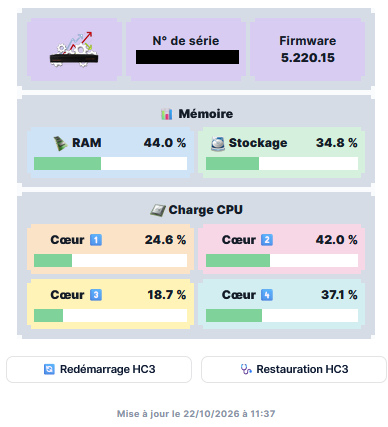
-
Hello, c'est mon tour, Yubbi pédale dans la semoule si je suis hors Wifi
-
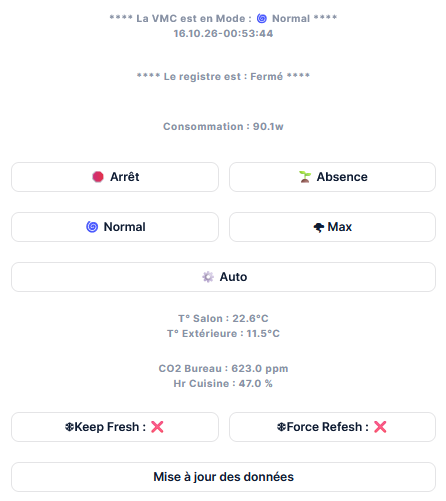
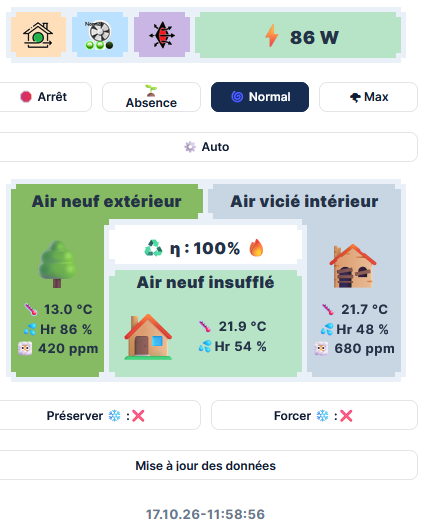
Hello, nouvel exemple avec de l'HTML --> Edit : mise à jour de la vue avec les icones des devices
-
Tu as toutes les remontée de conso ?
-
A n'y rien comprendre, MAJ faite... toujours 23 devices sans Modèle dont une WallPLug Source : https://changelog.yubii.cloud/?lang=FR&version=5.220.11&platform=HC3
-
Effectivement ... Heureusement que je n'ai pas lancé l'upgrade Source : https://changelog.yubii.cloud/?lang=FR&version=5.220.11&platform=HC3
-
Ca c'est intéressant, peut-être que ça fix les 23 devices sans modèle chez moi depuis la 5.220.11
-
Thank you for using our gateway! Be sure to update to the latest version to enjoy new features and improvements. Important notice: Version 5.220.15 is a hotfix for version 5.220.11. The update resolves: Changes related to the validation of variables for backward compatibility have been rolled back. Fixed rare issue with controlling Nice and Elero devices in the case of failed communication with a large number of devices in the system. Fixed problem where Climate panel changes do not update the temperature on the Heat Controller (FGT001) after migration from Z-Wave 2 to Z-Wave3 Main features: NICE cameras Wizard in the mobile binding Adding your NICE cameras has never been easier. The brand-new setup Wizard, now available directly in the mobile binding, guides you through the whole process step by step - no hassle. Nice High-Load Control support Added support for a new product, featuring a dedicated setup wizard for easy configuration and seamless switching between Switch and Thermostat modes. What's new: Device Added Smart Start support for DoubleDimmer-Control and On/Off-Control 2 devices. Only one NICE camera plugin instance can be running in the system. Gateway connection Added the ability to assign user defined names to slave hubs from within the interface. KNX Added dynamic IP address handling for the KNX Bridge - changing the address does not cause a loss of connection. Added routing support. Added support for secure connections using certificates in the tunneling and routing options. Nice* Added the option to disable sun impact by setting 0 lux value in Domi WS/WSR device parameters. Added a new Nice Home device pairing flow with the correct protocol selection and a separate instruction for tubular motors. Other Improved system stability. Improved Wizard buttons so longer descriptions are more visible and can be scrolled when selected. Plugins Update the Tedee Lock integration to the new API. Users Added the ability to change the hub interface language for installers and support users without having to change the client interface language globally. Z-Wave Z-Wave migration process optimization. Optimized reinteview of various devices after migration from Z-Wave 2.0 to Z-Wave 3.0.* Improved detection of device model changes after an update so that the control panel receives current data without restarting it. Improved S2 Unauthenticated device inclusion by removing the incorrect PIN or DSK confirmation requirement. Added Zvidar water valve integration with a valve role, parameter template, and default name in Z-Wave 3. Bug Fixes: Devices Fixed a problem that caused information about a different device to be displayed when adding multiple devices sequentially using Smart Start. Fixed a problem where scrolling through the device settings view would delete unsaved changes. Fixed the behavior of the hide function in the device binding Wizard. Fixed search functionality in the device binding Wizard - searching within categories. Improved the preview of scaled parameters to show readable values instead of raw protocol values. Improved the Wall Keypad template for version 2.x by removing unsupported battery handling. Fixed enabling the LAPD ring color mode for Walli Controller/Nice Walli Controller. Fixed Fibaro Roller Shutter 4 / Nice Roll-Control 2 after stopping calibration and removing RF protection. Fixed MCO Home A8-9 sensor installation so the device is correctly recognized and configured. Fixed real-time clock setup for the Nice Warm Control thermostat after adding it to the gateway. Fixed the English translations of parameters 22 and 24 for Nice Motion-Control and Fibaro Motion Sensor. Fixed slider-based parameter setting for Plug-Control 2 and refresh of the read value after changes from other sources. Improved association behavior for MCO occupancy sensors in Z-Wave 2 to match Z-Wave 3. Fixed the gate status display for Fibaro Smart Implant / Nice Smart-Control controllers so it correctly shows the open and closed states. Gateway connection Fixed auto-logout functionality from all open windows when controller becomes a slave. Restored some of the device status notifications for the slave hub. Fixed inactive “Update and restore” buttons for Gateway Connection backups created with a newer software version. Fixed displaying the Slave hub name in Gateway Connection. KNX Disabled favorite position control for roller shutters without positioning. Fixed an incorrect KNX device type when the “Open/Close” state is configured. Nice* Fixed misalignment in the translations of the open/close event notifications for the BiDi-Zwave device. Incomplete screen temporarily displayed in the Nice device configuration window. Added pergola role support for BiDi-Awning in Yubii, including migration of existing configurations. Improved Nice Engine compatibility when updating the gateway from version 5.020 to 5.210. Fixed the OFF action for Revio SW so it sends the STOP command instead of DOWN. Other Added small corrections to the translations. Fixed visibility of inactive tabs in the dark user interface theme. Fixed an issue where the creation and modification dates of a variable would change after the system was restarted. Minor UI/UX fixes. Fixed the missing border and styling of the “Upload Backup” button. Fixed missing filters on the dashboard. Improved Smart Start QR code scanning on iOS to make codes easier to capture with the camera. Added a push notification for the administrator when the system automatically rolls back to the previous software version. Added name filtering and sorting to the global variables list. Fixed mixed German and English text when creating scenes in the Yubii app. Added automatic launch of the NICE Cameras Wizard after adding the camera plugin. Fixed Error 502 in the Diagnostics > Z-Wave tab for Z-Wave 2 devices. Quick Apps Fixed a rare issue with Quick Apps that use a PIN code for locks following the migration from Z-Wave 2 to Z-Wave 3.* Improved the default icon for QA Device Controller and Generic Device Fixed the first HVAC mode override from a block scene so it respects the duration configured in the scene. Improved Quick App list behavior for single and multiple selection. Fixed the Nice Camera plugin room resetting to “Default” after adding another camera from the mobile app. Z-Wave Fixed device synchronization following the migration from Z-Wave 2 to Z-Wave 3.* Other fixes to the Z-Wave 2 to Z-Wave 3 migration process.* Fixed default tile visibility in the interface for ZW300 switches in version 2.x.* Fixed potential S0 communication error for newly added devices after migrating a old engine to new engine Z-Wave. Improved Z-Wave device compatibility after the Z-Wave 3 engine update, including reporting and configuration for affected devices. Fixed migration of FGBS-321 devices from Z-Wave 2 to Z-Wave 3. Fixed missing serial numbers for child devices added with the Z-Wave 3 engine. * - Does not apply to HC3L (Home Center 3 Lite). ** - Applies only to Z-Wave 3.0 engine. Security: Added the ability to enter longer passwords when connecting to Wi-Fi (up to 128 characters). Added additional protection for password visibility in the logs of internal services. Limited access to some KNX logs for users other than the administrator.
-
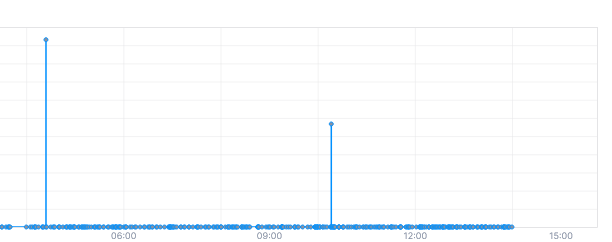
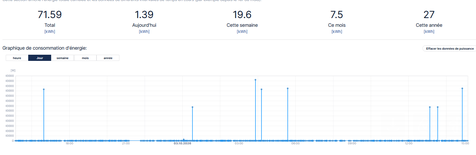
Verdict, je n'ai toujours pas la bonne puissance consommée sur la journée 4.09kwh pour un device qui consomme 2W ... ! Je vous avoue que le modulé étant encastré et étant un Qubino, j'ai la flemme d'aller le supprimer pour le re-inclure avec un interrupteur ... On verra quel il pleuvra depuis 3jours non stop
-
Hi @jang, Thanks for your feedback, don't hesitates if you ave some improvements for me
-
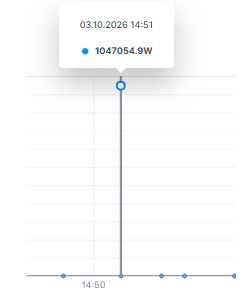
Je penche aussi pour une erreur côté module... néanmoins à 14h, j'ai supprimé mes 3 associations, depuis c'est le calme plat ... plus aucune remonté de puissance ni en ON ni en OFF ... Edit : Du coup, j'attends le retour du support pour restaurer mes puissances, sinon je ferai une restauration (j'avais fait une sauvegarde)
-
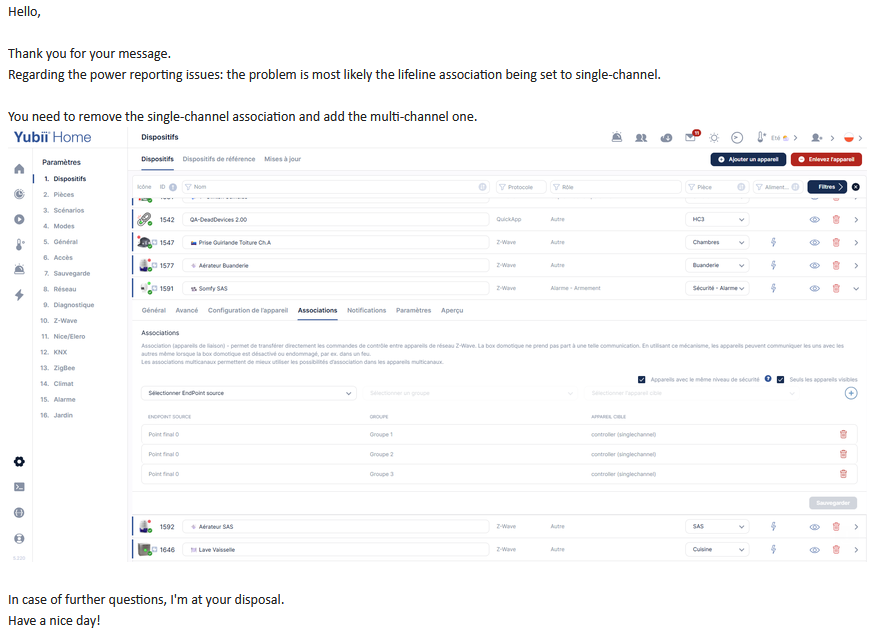
tiens @Lazer, je vais avoir besoin de tes lumières... J'ai posté 2 questions au support 1. un Heavy Duty OFF qui remonte une consommation sur la journée 2. des pics de consommation énorme sur un double switchs Qubino 1. ils répondent à côté. 2. je ne comprends pas le rapport entre associations et Puissance remontée Hello, Thanks for your support. Can you explain me, the relation between the end point association and the power monitoring ? Thanks, Réponse : The suggestion came from my colleague in the Software Department. He had resolved a similar issue on another system. You need to remove the single-channel association and add the multi-channel one. Let me know the result.
-
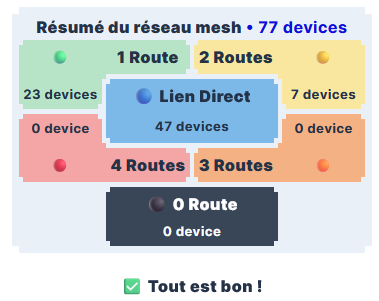
si ca te va, je laisse comme ça. Petit nettoyage mise à jour des devices à batteries notamment et 1 WP qui allait chercher 4 routes alors qu'elle est à 30cm de la HC3
-
Quick app - HC3 - Monitored Conso
TitiXsi a répondu à un(e) sujet de TitiXsi dans Quick App Developpeur
Malheureusement c'est un compromis... J'ai mis une dimension de mini 400px de large pour ne pas avoir d'effet de bord sur les longueurs de noms et les jauges. Tu peux essayer avec une résolution plus petite sur ton smartphone, normalement ça doit être ok. Edit : je peux essayer de coder un truc, j'essaie cette semaine. -
Malheureusement c'est un compromis... J'ai mis une dimension de mini 400px de large pour ne pas avoir d'effet de bord sur les longueurs de noms et les jauges. Tu peux essayer avec une résolution plus petite sur ton smartphone, normalement ça doit être ok. Edit : je peux essayer de coder un truc, j'essaie cette semaine.
-
Quick-App Suivi des Batteries Fork By TitiXsi
TitiXsi a répondu à un(e) sujet de TitiXsi dans Quick App Developpeur
version 6.08 postée -
On, tu démarres la QA et elle tourne en boucle Off, la QA est arretée, rien ne tourne version 5.03 postée
-
Quick app - HC3 - Monitored Conso
TitiXsi a répondu à un(e) sujet de TitiXsi dans Quick App Developpeur
version 5.07 postée -
J'ai peut-être une idée pour modifier les tuiles de résumé qui pourrait être plus explicite
-
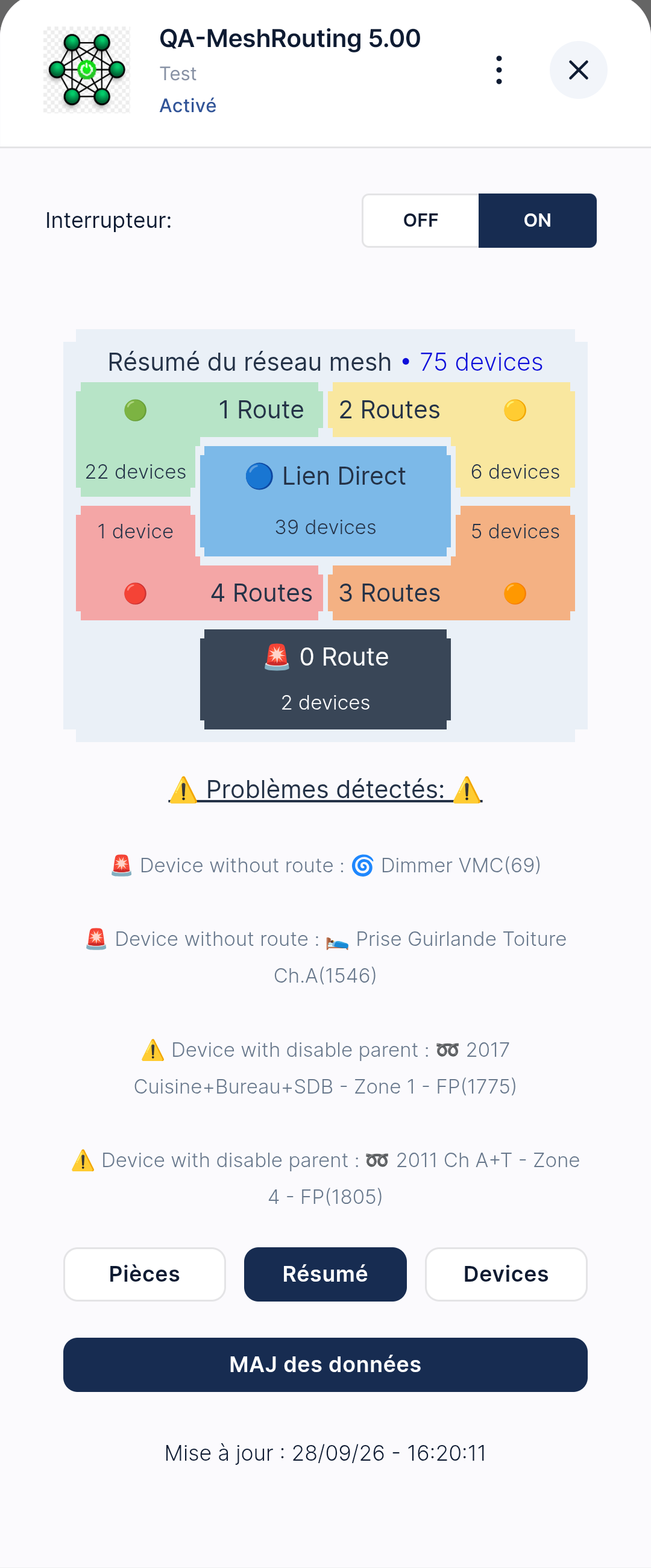
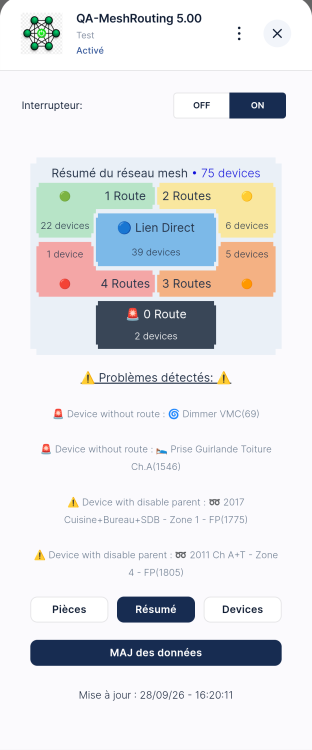
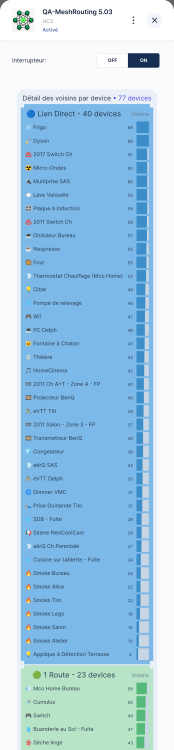
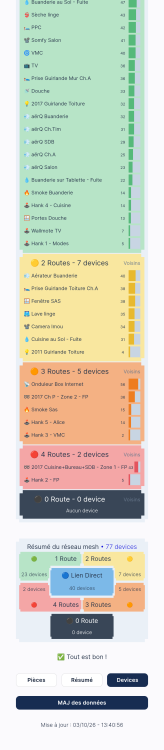
On parle de lien direct quand aucun device n'est nécessaire pour relier la box. En revanche en réseau mesh, on parle de saut mais les api remonte le terme route... On pourrait discuter de la sementique mais quand un device n'a pas de route ou ne peut pas dire qu'il n'a pas de saut... Ce serait une erreur et on pourrait confondre avec le lien direct... Donc 1 route c'est qu'il a 1 device utilisé pour dialoguer. 2 toutes, ces 2 devices successifs.... le maxi étant 4 en zwave.
-
Tant mieux si elle est utile. Le ON OFF volontairement purement manuel, vu que c'est une QA qui tourne en boucle et peux envoyer des Push, c'est préférable de stopper temporairement quand on n'a pas d'action possible à court terme, weekend, vacances...
-
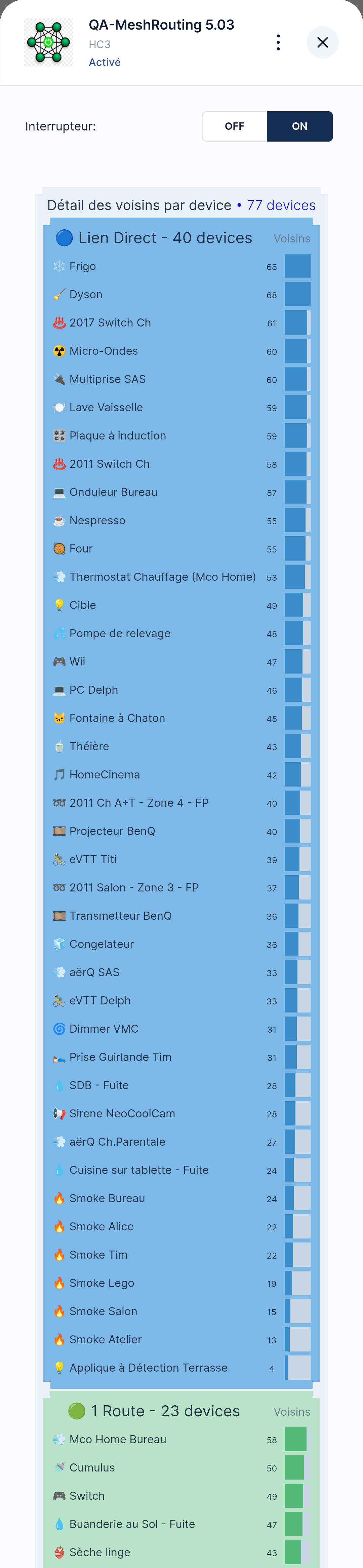
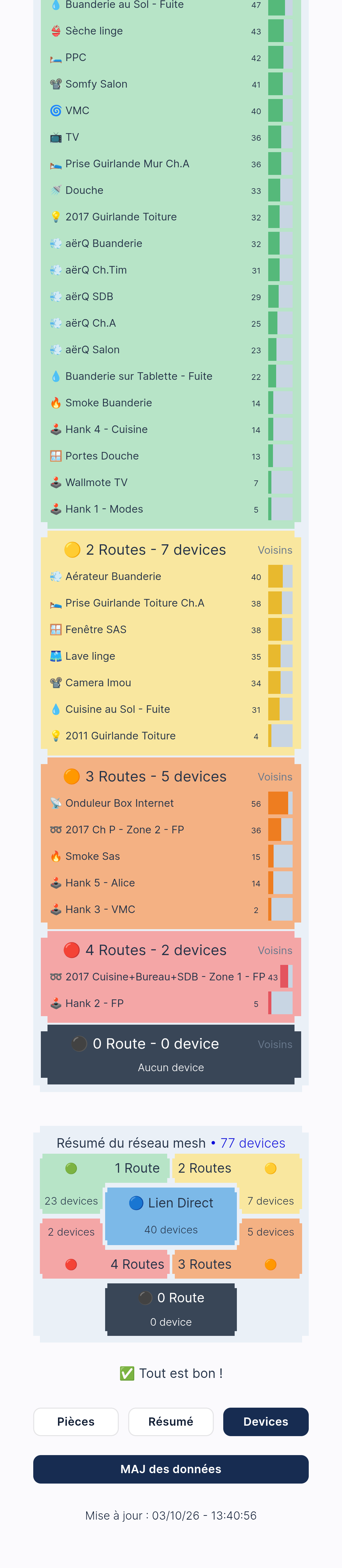
Hello, pas de voisin signifie qu'il n'a pas de possibilité de passer par d'autres device pour envoyer ou recevoir. Ce n'est pas forcément un gros problème si le module dialogue en direct avec la box. Mais ce n'est pas idéal.. un refresh du réseau mesh pour ce device peut être intéressant. Oui je mettrai la même jauge dans les 3 QA dès que possible.
-
Quick app - HC3 - Monitored Conso
TitiXsi a répondu à un(e) sujet de TitiXsi dans Quick App Developpeur
Hello, merci pour ton retour J'ai prévu les mises à jour, j'ai noté un bug esthétique pour la barre à 100% Malheureusement, je suis indispo quelques jours... Je posterai les 3 QA updatées un peu plus tard. -
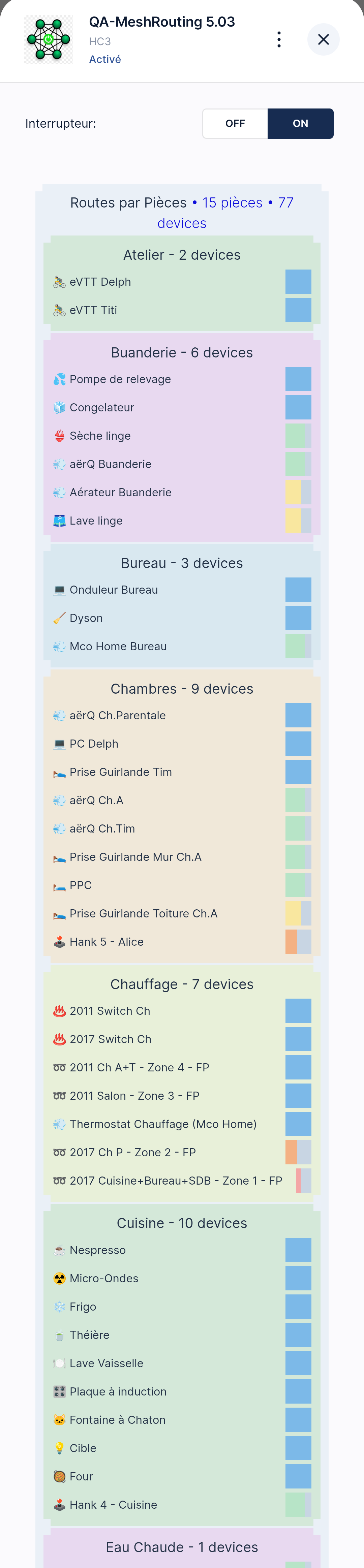
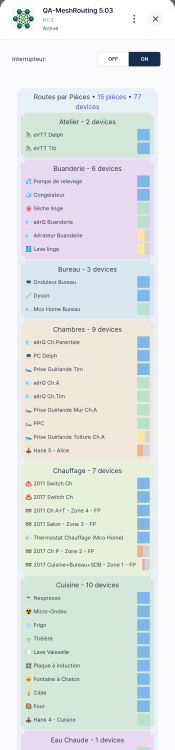
Hello, dans la suite de la refonte de mes QA en HTML, je vous partage ma QA qui me permet de suivre l'état du réseau Mesh La vue en HTML: La vue sous Yubbi: Les icones qui changeront automatiquement : La variables globale à créer pour les Push : Le fichier à télécharger: QA-MeshRouting_5.03 - 03.10.2026.fqa Have Fun ! Je m'excuse par avance des fautes d’orthographes qui peuvent être encore présentes... Edit 03.10.2026 : nettoyage du topic avec le post de la QA avec vue HTML

-
En fait non c'est pas con comme réponse c'est juste faux. Typiquement tu prends le module qui gère les fils pilote, le modèle est un dimmer or ça n'a rien à voir avec un gradient, c'est un changement de type d'onde électrique...